How MyOsicam works
One panel. Any number of OScam servers. Up and running in minutes — without touching your existing OScam setup.
Your existing OScam keeps running exactly as-is. MyOsicam adopts the setup you already have — no re-configuration, no migration, no downtime. You get a single pane of glass from day one.
System overview
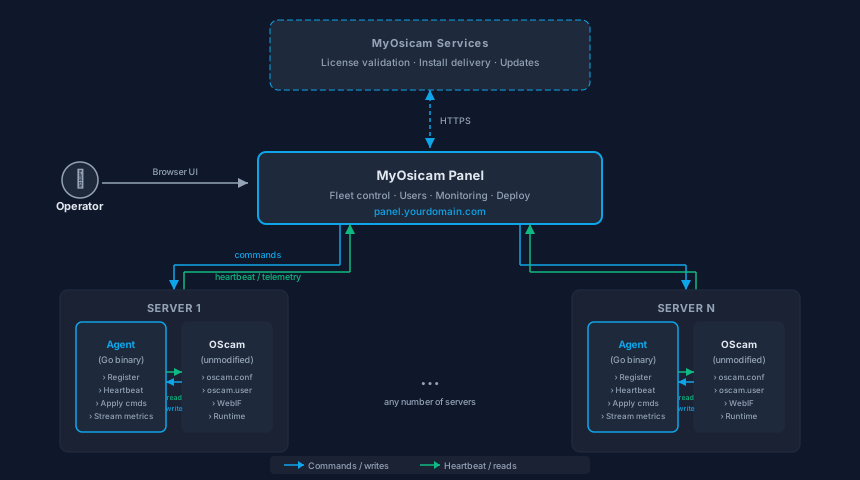
Five steps to a managed OScam fleet
-
Install the panel
Run the one-line installer on any Ubuntu 22.04+ or Debian 12+ VPS and the MyOsicam panel is live in minutes. The panel is the control plane — it holds your fleet configuration, license, and operator accounts. Your OScam servers are not touched at this stage.
-
Install the agent
From the panel UI, trigger a one-command SSH install on each OScam server. The panel generates a signed install token, connects over SSH, and deploys the lightweight Go agent — no manual steps on the server required. The agent registers itself with the panel over HTTPS and begins sending heartbeats.
-
Discover & sync
Once registered, the agent scans the server for running OScam instances. It reads every configuration file, user list, webif settings, and runtime state, then streams a structured snapshot back to the panel. The panel builds an accurate picture of what you already run — all without touching your OScam setup.
-
Day-one single pane of glass
Immediately after the agent syncs, every server and every OScam instance you already operate appears in your panel dashboard. Your existing OScam setup keeps running exactly as-is — no re-configuration, no migration, no downtime. You get a single place to see status, connections, readers, and logs across your entire fleet from the first moment.
-
Changes write back
When you edit a user, toggle a reader, or change a setting in the panel, the agent applies the change directly on the server — updating the OScam config or user file and triggering a live reload via the WebIF. OScam continues to run independently; the agent is a management layer, not a dependency for OScam's operation.
Curious about how the agent discovers OScam instances, how it secures communication, and what data it sends back? Read about the agent