The MyOsicam agent
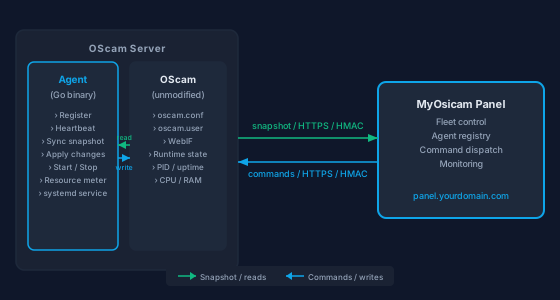
A lightweight Go binary on each of your OScam servers — the trustworthy, transparent bridge between your existing setup and the panel that manages it. No changes to OScam. No inbound ports. No surprises.
Root access: once, at install only. Root access is needed exactly once: during the SSH-based install triggered from the panel. The installer uses root to create the systemd service unit and write a narrow sudoers rule that lets the agent start and stop OScam. After that, the agent daemon runs as its own unprivileged user — no root is involved in any routine operation.
What the agent does — and what it does not
What the agent does
- Discovers all OScam instances on the server: reads configuration files, user lists, webif settings, and runtime state.
- Sends a structured snapshot of each OScam instance back to the MyOsicam panel over HTTPS.
- Registers itself with the panel on first start and sends periodic heartbeats so the panel always knows the server is reachable.
- Applies panel-initiated changes locally: updates oscam.user and oscam.conf files, then triggers a live WebIF reload — no OScam restart needed.
- Supports remote start, stop, restart, and reload of OScam instances on command from the panel.
- Collects lightweight resource readings (CPU usage, RAM consumption, system load) and reports them to the panel.
- Runs as a systemd service, restarting automatically if it crashes — without affecting OScam.
What the agent does NOT do
- Does not replace OScam or modify how OScam runs — OScam continues to operate exactly as you configured it.
- Does not need root for runtime operations; only the one-time install step (which sets up the systemd service and a narrow sudoers line) requires root privileges.
- Is not a dependency for OScam: if the agent stops or the panel is unreachable, OScam keeps serving your subscribers without interruption.
- Does not transmit subscriber card data, entitlement details, or any DVB decryption material to MyOsicam — only management-plane metadata (instance list, config summaries, resource readings) leaves your server.
- Does not open any inbound ports on your server — all communication is outbound from the agent to the panel.
- Does not modify your existing OScam configuration without an explicit instruction from the panel.
How the agent communicates with the panel
Supported operating systems
| Operating system | Minimum version | Notes |
|---|---|---|
| Ubuntu | 20.04 | Fully supported. Ubuntu 22.04+ recommended for new installs. |
| Debian | 12 | Supported on Debian 12 with standard systemd. |
Registration & heartbeat
When the agent starts for the first time it registers with the MyOsicam panel over HTTPS, sending its host identity and a one-time install token that was generated by the panel before the SSH install was triggered. The panel validates the token, accepts the registration, and assigns the agent a stable server ID.
After registration, the agent sends a heartbeat to the panel every minute. Each heartbeat updates the server's last_seen timestamp in the panel. If a server misses several consecutive heartbeats, the panel marks it as unreachable and alerts the operator — no manual checking required.
The token is single-use and expires shortly after install. Subsequent heartbeats are authenticated by HMAC signatures on every request, so no long-lived credentials are stored on the server beyond the shared secret established at registration.
Security: HMAC & install tokens
Every request the agent sends to the panel is signed with an HMAC-SHA256 signature computed from a shared secret established at registration. The panel verifies the signature on every inbound call; requests with a missing or incorrect signature are rejected immediately. This means even if someone intercepts the network traffic, they cannot forge a valid agent request.
Agent install tokens are the mechanism the panel uses to safely bootstrap a new agent. When you trigger an install from the panel UI, a short-lived, single-use token is generated and passed to the installer script over SSH. The agent presents this token on its first registration call; the panel checks that the token exists, is unused, and has not expired before accepting the registration. Once used, the token is invalidated — it cannot be replayed.
No inbound ports need to be opened on your server. The agent always initiates the outbound HTTPS connection; the panel never connects back to the agent directly.
What data gets synced to the panel
The agent sends only management-plane metadata — no subscriber card data, entitlement information, or DVB decryption material ever leaves your server. Here is a representative sample of what is included in a sync snapshot:
- OScam instance list — name, config path, working directory, PID file location.
- Configuration summary — reader count, protocol ports, global settings from oscam.conf.
- Reader and account (oscam.user) entries — usernames, enabled state, caid/ident lists.
- WebIF endpoint — host, port, and current reachability status.
- Runtime status — running / stopped, process ID, uptime in seconds.
- Resource readings — CPU usage (%), RAM consumption (MB), system load average.
Want to see the full picture — from panel install to day-one single pane of glass? See how it all works